

How Key Fob and Card Access Systems Improve Workplace Safety

by Tomasz

Workplace safety starts with controlling who can enter a building and what areas they can access. Modern access control systems replace traditional keys with electronic credentials, card readers, smart locks, and centralized software that manages entry permissions.

For Chicago businesses operating in offices, manufacturing facilities, government buildings, and multi‑tenant commercial properties, reliable access control solutions help keep employees, customers, and assets secure while maintaining everyday convenience.

What Are Key Fob and Card Access Control Systems?

Before exploring their safety benefits, it helps to understand how access control systems work.

An access control system is a security solution that regulates who can enter a building or specific areas inside it. Instead of metal keys, users rely on physical credentials such as key fobs, key cards, or mobile credentials stored in devices like Apple Wallet. These credentials communicate with card readers installed near each door.

A typical access control deployment includes several connected components:

  • Card readers and access control devices installed near each door
  • Smart locks, electric strike hardware, and electronic locks that secure the door
  • Physical credentials such as key fobs or key cards assigned to users
  • Management software that controls permissions and records door events
  • Network connectivity that allows administrators to monitor the system remotely

Once a credential is presented to the reader, the system verifies whether that user has permission to enter. If authorized, the electronic lock releases and the door unlocks.

Because permissions are managed through software, administrators can update users, revoke credentials, or adjust system configuration instantly without replacing physical locks. This flexibility makes access control one of the most reliable security systems available for modern workplaces.

Why Workplace Safety Starts With Controlled Access

Workplace safety begins with knowing who can enter the property and when those individuals are present.

Without controlled entry systems, businesses often rely on traditional keys that can be copied or shared. This makes it difficult to maintain secure access and can create vulnerabilities in commercial environments where many employees, vendors, and visitors move through the building daily.

Access control solutions reduce that uncertainty. Each user receives unique credentials, and every door interaction is logged in the system. These door events create a clear record of building activity, which supports security monitoring and compliance requirements.

When integrated with cameras, alarms, and video surveillance systems, access control technology allows organizations to achieve a higher level of protection for employees and property. The result is a safer environment that supports both physical security and operational peace of mind.

7 Ways Key Fob Access Control Systems Improve Workplace Safety

Key fob access control systems offer more than convenience. They provide a structured way to secure doors, manage users, and monitor building activity.

1. They Help Prevent Unauthorized Entry

Access control devices ensure that only authorized users can unlock doors and enter restricted spaces. Instead of relying on shared keys, each credential is assigned to a specific employee.

If a credential is lost, administrators can disable it immediately. This simple capability keeps facilities secure without requiring costly lock replacements.

2. They Restrict Access to Sensitive Areas

Not every employee needs access to every part of a building. Access control systems allow administrators to create role‑based permissions for specific areas.

Examples of restricted spaces include:

  • Server rooms and technology infrastructure
  • Inventory storage rooms
  • HR offices and confidential record storage
  • Financial departments or compliance offices

This controlled access protects sensitive information, valuable assets, and secure storage areas.

3. They Create a Clear Audit Trail

Every credential interaction generates a log entry. These door events show when users accessed a door and what credential was used.

Access logs help security teams investigate incidents, monitor employee activity, and meet regulatory compliance requirements. When integrated with cameras and video systems, these logs provide valuable context for reviewing security events.

4. They Improve Emergency Response and Lockdown Control

Access control systems allow administrators to respond quickly during emergencies or security incidents.

Key capabilities include:

  • Remotely locking or unlocking doors through access control software
  • Disabling credentials instantly if a threat or security concern arises
  • Restricting building zones to create controlled lockdown areas
  • Connecting entry systems with alarms and video surveillance to improve monitoring
  • Monitoring door activity in real time so security teams can respond quickly

These features help organizations maintain secure environments during emergencies while providing a higher level of situational awareness.

5. They Reduce Risks Linked to Lost or Shared Keys

Traditional keys can be misplaced or copied, creating potential vulnerabilities.

Access control eliminates that risk. If a credential is lost, administrators simply deactivate it and issue a replacement credential. This process avoids the cost of replacing locks and helps keep the property secure.

6. They Support Safer Visitor and Contractor Access

Businesses frequently allow temporary access to vendors, contractors, and service providers. Access control solutions make these visits safer by limiting where and when individuals can enter.

Key visitor management capabilities include:

  • Issuing temporary credentials for visitors or contractors
  • Limiting access to specific doors or areas within the building
  • Scheduling access windows so entry only works during approved hours
  • Integrating visitor management systems to track guest activity
  • Linking entry logs with video monitoring to capture visitor activity

These tools allow businesses to maintain operational convenience while keeping sensitive areas secure.

7. They Make Security Easier to Manage Across Growing Teams

As organizations expand, managing building access becomes more complex.

Access control software centralizes user management, allowing administrators to update credentials across multiple doors or locations. This approach simplifies system deployment for growing companies and ensures security policies remain consistent.

Key Safety Features to Look For in Modern Access Control Systems

Not all access control solutions provide the same capabilities. Businesses should prioritize technology that supports reliability, monitoring, and long‑term flexibility.

Important features to look for include:

  • Cloud‑based access control software
  • Remote access and system monitoring
  • Integration with cameras and video surveillance
  • Smart locks and electric strike hardware
  • Support for mobile credentials such as Apple Wallet
  • Integration with other security systems such as alarms
  • Visitor management systems for tracking guests
  • Flexible system configuration for different user roles

Together, these features create a best access control solution that balances security, convenience, and operational efficiency.

Key Fob vs. Key Card Access Systems: Which Is Better for Your Workplace?

Both credential types provide similar security capabilities, but each has advantages depending on the environment.

Feature Key Fobs Key Cards
Format Small device carried on a keychain Credit‑card sized badge
Durability Durable and resistant to wear Can bend or wear over time
Convenience Easy to carry with keys Works well with employee ID badges
Best environments Manufacturing facilities and high‑traffic entry points Offices, corporate environments, and government buildings

Some businesses choose to combine both credential types to extend flexibility across departments and access levels.

How Chicago Key Card Access Systems Support Local Businesses

Chicago businesses often operate in dense commercial environments where multiple tenants, delivery services, and employees move through the property daily.

Commercial access control systems help manage these challenges by controlling entry across multiple doors and floors. Businesses can connect card readers, smart locks, and surveillance cameras to a unified network that monitors activity across the entire building.

These systems are commonly used in:

  • Commercial office buildings
  • Manufacturing facilities and warehouses
  • Healthcare clinics and laboratories
  • Government buildings
  • Multi‑tenant commercial properties

With reliable installation and system deployment, businesses gain better visibility into building activity while maintaining secure entry for authorized users.

How to Choose the Right Access Control System for Your Workplace

Selecting the best access control solution requires evaluating both security risks and operational needs. Businesses should consider:

  • The number of doors and access points
  • The number of users who require credentials
  • Whether remote access and monitoring are necessary
  • How the system will integrate with cameras, alarms, or video surveillance
  • Future expansion or property growth

A properly designed system allows organizations to connect multiple security technologies into a unified network that protects people, assets, and sensitive areas.

Read our blog on 5 advanced card access that we provide at Chicago Security Expert!

Why Professional Installation and Planning Matter

Even the most advanced technology will not perform well without proper installation.

Professional installers ensure that card readers, smart locks, electric strike hardware, and door sensors are correctly configured. They also help businesses integrate access control with other security systems such as cameras, alarms, and monitoring platforms.

With the right installation approach, businesses gain a reliable and scalable access control system that supports long‑term security and operational peace of mind.

Strengthen Workplace Safety With Smarter Access Control

Strong access control is one of the most effective ways businesses can protect employees, property, and sensitive areas. Modern commercial access control systems allow organizations to manage building entry, monitor activity, and integrate security technologies like video surveillance, alarms, and smart locks into a single, reliable solution.

At Chicago Security Expert, our team helps businesses design and install access control solutions tailored to their building, operations, and security needs. From card readers and smart locks to full commercial access control system deployment, we focus on solutions that keep your property secure while remaining convenient for employees and authorized visitors.

If you are evaluating key fob access control systems or Chicago key card access systems for your facility, our specialists can help you choose the right technology, configure the system properly, and ensure a smooth installation.

Contact Chicago Security Expert today to schedule a consultation and learn how a professionally designed access control system can improve workplace safety for your business.

FAQs

How do key fob access control systems work?
Key fob access control systems use electronic credentials that communicate with card readers installed near a door. When the system verifies the credential, the electronic lock releases and the door unlocks.

Are key fob access control systems safer than traditional keys?
Yes. Credentials can be disabled instantly if lost, and the system records door events that help security teams monitor building activity.

What is the difference between key fob and key card access systems?
Key fobs are small devices attached to keychains, while key cards resemble ID badges. Both function as physical credentials that grant authorized users entry through card readers.

Can access control systems track who enters a building?
Yes. Most systems log door activity, allowing security teams to review entry records and connect them with video surveillance if needed.
Wireless Security Explained: Setup, Benefits, and Limitations

by Tomasz

Wireless security systems have become one of the most popular choices for modern homeowners and businesses looking to protect their properties without the hassle of complex wiring. With wireless components, smart home integrations, and cloud storage options, they deliver both convenience and high-level protection.

In this guide, we’ll break down everything you need to know about wireless security systems, how they work, their setup, benefits, limitations, and how to choose the best system for your Chicago home or business.

What Is a Wireless Security System?

A wireless security system uses Wi-Fi, radio frequency (RF), or cellular connection to link sensors, cameras, and control panels without traditional wiring. Instead of running cables through walls, these wireless devices communicate securely through encrypted signals to a base station or hub, keeping the entire system connected and monitored.

Core Components of Modern Wireless Security Systems:

  • Base station or control panel: The main hub that connects all wireless devices and communicates with the monitoring center.
  • Wireless sensors: Entry sensors, motion sensors, and glass break detectors that alert you to movement or intrusion.
  • Wireless security cameras: Indoor and outdoor cameras, including video doorbells and battery-powered options, with HD video quality, color night vision, and two-way audio.
  • Cellular backup: Ensures the alarm system stays connected during power outages or loss of internet connection.
  • Cloud storage: Stores video footage from your security cameras for easy playback.
  • Professional monitoring: 24/7 monitoring service that provides immediate response and dispatch when alarms are triggered.

How Wireless Signals Work in Security Systems

Wireless alarm systems and cameras communicate over Wi-Fi or RF bands. When a motion sensor detects activity, it sends a signal to the base station, which triggers alerts and records video footage if cameras are included. For added reliability, many systems use cellular backups to maintain monitoring even when Wi-Fi connectivity is interrupted.

Wireless Alarm Systems vs. Wireless Security Cameras

Wireless alarm systems focus on detecting unauthorized entry or hazards, while wireless security cameras provide visual confirmation and recorded evidence. Most systems combine both for full protection.

Wireless Alarm Systems Explained

A wireless alarm system includes basic sensors like door/window contacts, motion detectors, and glass break sensors. These connect to the base station wirelessly, activating alarms or alerts through a mobile app or professional monitoring plan.

Wireless Security Cameras Explained

Wireless security cameras connect to your network to stream live video. Many models, such as Nest Cam, Arlo cameras, and other smart home cameras, integrate with Alexa and Google Assistant for voice control. These devices often include smart features like facial recognition, person detection, and video verification through your monitoring service.

Why You Need Both

Combining wireless alarm systems with wireless cameras gives you layered protection, detection plus visual confirmation. Together, they help prevent false alarms and ensure faster emergency response.

Wireless vs. Wired Security Systems

When choosing between wireless and wired systems, consider your property layout and long-term goals. While wired cameras offer unmatched stability, wireless systems provide flexibility and easy upgrades.

Advantages of Wireless Security Systems:

  • Fast installation: DIY installation or professional installation can often be completed within hours.
  • Flexibility: Perfect for renters or property owners who may move or remodel.
  • Smart home features: Seamlessly integrates with other smart home devices like smart locks, thermostats, and lighting.
  • Cellular backups: Maintain protection even when Wi-Fi is down.
  • Scalability: Easily add new wireless cameras, sensors, or smart devices.

Limitations of Wireless Systems:

  • Battery power: Devices require periodic charging or replacement.
  • Wi-Fi interference: Thick walls and neighboring networks can reduce performance.
  • Cybersecurity risks: Must follow strong password and firmware update practices.

When a Wired or Hybrid System Is a Better Fit

Wired cameras and wired video doorbells may suit large properties or businesses with stable network access points. Hybrid systems can combine the reliability of wired setups with the flexibility of wireless components.

Planning a Wireless Security System

Before you begin installing wireless devices, it’s essential to map out your space and identify specific vulnerabilities. Proper planning ensures every part of your property receives reliable coverage and reduces blind spots.

1. Assessing Risk and Coverage

Consider all entry points, blind spots, and valuable areas. For homes, prioritize the front door, garage, and backyard. Businesses should secure loading docks, offices, and parking lots.

2. Designing the Alarm Layout

Install entry sensors at every accessible door or window, and place motion sensors in high-traffic zones. Add smoke and CO sensors for safety compliance.

3. Designing the Camera Layout

Position wireless cameras to cover entrances, driveways, and hallways. Use wide-angle home security cameras for larger coverage areas. Weatherproof outdoor models perform best in Chicago’s changing climate.

4. Connectivity and Power Planning

Check Wi-Fi signal strength at each installation point. Add mesh routers or extenders for better Wi-Fi connectivity. Opt for battery-powered cameras when outlets are limited.

Setting Up a Wireless Security System

Setting up a wireless security system can seem straightforward, but following a few best practices ensures everything connects smoothly and performs at its best. Understanding the layout and signal range beforehand helps minimize connectivity issues and prevents missed alerts.

Proper setup ensures your wireless home security system performs efficiently and covers every potential entry point. Taking time to plan before installation helps avoid signal issues and ensures seamless integration across all devices.

1. Pre-Installation Checklist

Confirm internet quality, prepare your Wi-Fi credentials, and unbox your wireless equipment. Install the manufacturer’s app to begin pairing.

2. Installing the Wireless Alarm System

Mount the base station in a central, discreet area. Sync all sensors, test alarm triggers, and ensure communication with your professional monitoring service.

3. Installing Wireless Security Cameras

Mount cameras securely near key entry points. Adjust angles to optimize video quality and avoid glare. Enable color night vision and test live feeds.

4. App Configuration and Smart Home Integrations

Customize alerts and monitoring plans within your app. Integrate your wireless security system with Google Home, Amazon devices, or other third-party devices to automate lighting or locks.

5. When to Call a Professional

If DIY installation becomes complex, an installation professional from Chicago Security Expert can optimize your wireless system, ensuring maximum signal strength and coverage.

Key Benefits of Wireless Security Systems

Understanding the primary advantages of wireless systems helps homeowners and business owners make informed decisions. These benefits highlight why wireless technology has become the standard for modern security solutions.

  • Faster, Cleaner Installation: Unlike traditional wired setups, wireless home security systems can be installed without drilling or rewiring. Professional installation ensures optimal performance and minimal disruption.
  • Flexibility and Scalability: Wireless devices can be moved or expanded easily, making them ideal for growing families or expanding businesses.
  • Remote Access and Smart Features: Monitor your property via smartphone, tablet, or computer. Access live video footage, control smart locks, and get person detection alerts in real time.
  • Backup Power and Connectivity: Battery backups and cellular connections maintain uptime during power outages, ensuring continuous protection.

Limitations and How to Manage Them

Even with all their benefits, wireless systems come with certain challenges that can affect performance if not managed properly. Understanding these potential issues helps homeowners and businesses maintain reliability and avoid downtime.

  • Wireless Interference: Chicago’s older brick structures can weaken Wi-Fi signals. Use dual-band routers or access points to minimize interference.
  • Battery Life and Maintenance: Check batteries quarterly, especially during cold winters when battery power drains faster. Some premium plans include automatic battery replacement.
  • Cybersecurity and Privacy: Secure your wireless home security system by updating firmware, using encrypted Wi-Fi, and monitoring account access.
  • False Alarms: Calibrate motion sensors to reduce false triggers. Video verification helps confirm legitimate events before dispatching emergency responders.

Costs and Budgeting

Understanding the costs associated with wireless security systems helps you plan for both immediate expenses and long-term ownership. From upfront hardware to monthly monitoring plans, budgeting carefully ensures you get the right level of protection without overspending.

1. Upfront Costs

Basic DIY systems start around $200, while professionally installed home security systems range between $500–$1,500. Costs vary based on camera count and monitoring service selection.

2. Ongoing Costs

Professional monitoring plans average $20–$50 per month. Cloud storage and smart analytics add small recurring fees.

3. DIY vs. Professional Installation

DIY installation can save money, but professional installation guarantees reliability, compliance with industry standards, and optimized smart platform integrations.

Choosing the Right Wireless Security System

Selecting the ideal wireless security system requires balancing your property’s unique needs, budget, and preferred monitoring level. Understanding key features beforehand ensures your investment delivers long-term reliability and smart functionality.

Look for systems with encrypted communication, HD security cameras, cellular backup, and smart home compatibility. Wireless systems with self-monitoring options offer flexibility.

Questions to Ask Installers:

  • Does the system include free equipment or contract terms?
  • What is included in the professional monitoring plan?
  • Can it integrate with other smart home devices?
  • How long is data retained in cloud storage?

Avoid low-quality systems without customer support or those lacking video doorbells and remote access. Always test each device before finalizing installation.

Wireless Security Systems for Chicago Properties

Chicago’s diverse architecture and climate create unique challenges and opportunities for home and business security. Understanding how wireless systems adapt to local conditions helps property owners make informed choices.

Wireless home security systems protect against package theft, garage intrusions, and porch break-ins. Many Chicago homeowners use video doorbells and wireless cameras for live front door monitoring.

For offices, restaurants, and retail locations, wireless systems provide centralized control. Smart home features like automation and remote management enhance productivity and security.

How Chicago Security Expert Can Help

Working with a trusted local security provider ensures your wireless system is designed with precision and backed by expert guidance. Chicago Security Expert specializes in tailoring security systems to meet the city’s unique architectural and safety needs.

Our team evaluates your property, Wi-Fi connectivity, and layout before designing a tailored wireless security system. Chicago Security Expert ensures your wireless alarm system, wireless security cameras, and other smart home devices are installed and optimized by experienced technicians.

We provide 24/7 professional monitoring, routine maintenance, and firmware updates to ensure your system operates at peak performance year-round.

The Future of Wireless Security in Chicago

Wireless security systems represent the future of modern home security. They combine advanced wireless technology, professional monitoring, and smart home integrations to deliver flexibility, reliability, and complete peace of mind. Whether you’re looking for a DIY system or professional installation, Chicago Security Expert can design a custom wireless home security system featuring wireless security cameras, smart devices, and 24/7 monitoring service tailored to your property. Contact us today to lock in your wireless home security system.

FAQs

Q: Are wireless security systems reliable?
Yes. With cellular backups and encrypted communication, wireless systems offer reliability similar to wired options.

Q: Can wireless cameras work without Wi-Fi?
Some models use local storage or cellular connection for independent operation.

Q: Are wireless systems vulnerable to hacking?
Only if unsecured. Regular software updates and strong passwords protect your data.

Q: How long do batteries last?
Most systems use long-lasting battery power that endures 6–24 months depending on usage.

Pre-Wiring Suggestions for Monitoring, Cameras, Networks, Televisions, and Speakers

by Tomasz

Being a professional security and monitoring expert for over 12 years , I’ve seen a lot of homeowners caught in troublesome situations due to improper pre-wiring by a contractor or themselves. The potential drawbacks are vast. These suggestions will aid you in making sure the correct wires are run in the proper areas. Ideally, these suggestions will help you save money and time, leaving you with an optimized outcome. These recommendations are based on experiences I’ve had and offered solutions for. Feel free to share your own suggestions by leaving a comment in this article’s dedicated forum thread.

Exposed wiring should be covered up.

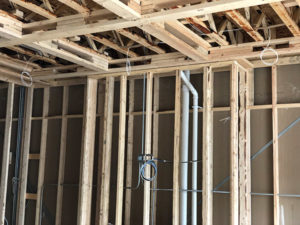
Although you might be gentle with your expensive 50’ HDMI cable, not everyone performing work on your property will treat it with kid gloves. Once your whole home has been wired, use plastic bags to cover up any exposed wiring. The bags should be wrapped with electrical tape to make sure that they don’t come off. If the exposed cables aren’t secured, they might be painted over and textured with the rest of the house. Make sure that the cables are tied up in a manner that gives the contractors access to the drywall (so that they can cut holes in the walls where necessary).

Having your exposed wiring covered up protects it when renovation work is being carried out in your home.

Read more